



Raphaël Freeman
3. How to Kern Like a Pro
Good kerning starts in the font and is checked on the page. How I combine font editing, scripts and individual adjustments for consistent book typography.
Tag
Good kerning starts in the font and is checked on the page. How I combine font editing, scripts and individual adjustments for consistent book typography.
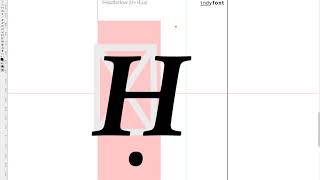
So there was a recent post on InDesign Secrets on how to find Ḥanuka in a document since it is spelt in so many different ways. One of the challenges of typesetting multilingual texts is that often special characters such as the Ḥ in the title above can be used. Not only is the ḥ common, but also ẓ, ṣ, ṭ, ḍ and even ḳ! The video below demonstrates how to create a custom ḥ in the correct font using the IndyFont Pro script. If you have a manuscript that has special typographic characters...

When the manuscript is complete and there are no more corrections, the next stage is the final one of “balancing” the book. This is the process whereby the recto and verso (the right- and left-hand pages in a left-to-right book) of each spread are adjusted to be the same length. The exception is the last page of a chapter, and also when a new section head starts on the recto. This is accomplished by three methods: Shorten or lengthen the spread by up to a line (ensuring that there isn’t more...

A widow is the last line of a paragraph at the top of a page. An orphan is the first line of a paragraph at bottom of a page.

The change of typeface has improved the situation overall, but it hasn’t addressed the biggest problem – spacing. In picture 3 we have taken

For quite some time, I would fiddle with the values until they were just so, but I decided that there must be a better way of doing this. I

In the below video I demonstrate how to achieve this in InDesign as well as quickly showing another favorite typesetting trick of mine of ho

Assigning styles aren’t necessary – it just can make the process for the author, editor and typesetter more efficent. However, as long as th

About ten days ago I was working on a project and was very frustrated. In InDesign the only way to make footnotes renumber at each chapter i