top of page


Markup

Search


Wonky Hyphenation
instructions on how to mark up pdf for hyphenation

Raphaël Freeman
Apr 24, 20222 min read
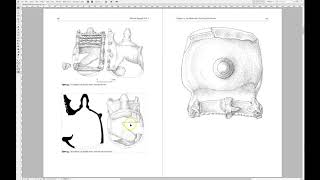
Marking the PDF after the pictures have been placed
However, if the quality of the image is not good enough for press, then the image will be imported as large as possible such that it will be
Raphaël Freeman
Mar 25, 20181 min read


3. How to Kern Like a Pro
This is the third of a 10-part series of the Ten Keys to Seamless Typesetting. Kerning is a necessary part of the typesetting process. Whereas in the past this could have meant filing the edge of a sort to fit two characters closer together, today the process is much faster. To a large extent, kerning is pre-programmed into a professional font, but not every letter combination is necessarily taken care of and even if it is, not necessarily to the liking of the typesetter.
Raphaël Freeman
Feb 2, 20181 min read
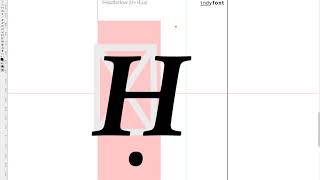
Ḥanuka
So there was a recent post on InDesign Secrets on how to find Ḥanuka in a document since it is spelt in so many different ways. One of the challenges of typesetting multilingual texts is that often special characters such as the Ḥ in the title above can be used. Not only is the ḥ common, but also ẓ, ṣ, ṭ, ḍ and even ḳ! The video below demonstrates how to create a custom ḥ in the correct font using the IndyFont Pro script. If you have a manuscript that has special typograp
Raphael Freeman
Dec 20, 20171 min read


Balancing the book
When the manuscript is complete and there are no more corrections, the next stage is the final one of “balancing” the book. This is the process whereby the recto and verso (the right- and left-hand pages in a left-to-right book) of each spread are adjusted to be the same length. The exception is the last page of a chapter, and also when a new section head starts on the recto. This is accomplished by three methods: Shorten or lengthen the spread by up to a line (ensuring that
Raphaël Freeman
Dec 6, 20171 min read


Oops I made a mistake
History It’s worth taking a step back to see how the process worked not that long ago. You would have typed up your manuscript on a typewriter. The typesetter would then have rekeyed your entire manuscript using specialised hardware or a computer system, changing your typewriter quotes to typographer quotes (or curly quotes), fixing your double hyphens to the correct dashes and so forth. The typesetter would then have printed out the galleys. These were strips of bromide (th
Raphaël Freeman
Sep 29, 20175 min read

Don’t put broccoli into your Word document!
In the above video I show the best way to indicate in your manuscript where pictures and captions need to go and also show you what happens
Raphaël Freeman
Mar 28, 20173 min read
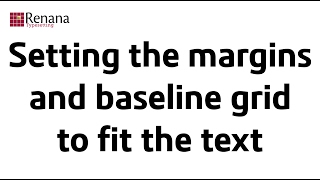
Setting the page margins in InDesign
For quite some time, I would fiddle with the values until they were just so, but I decided that there must be a better way of doing this. I
Raphaël Freeman
Feb 14, 20171 min read


Who stole my quote marks?
Well there are a few good options: You could buy a Mac :-) However, if like me, you are sticking to Windows, then if you are using software
Raphaël Freeman
Feb 13, 20174 min read


Boxes and Lines in Complex Layout
In the below video I demonstrate how to achieve this in InDesign as well as quickly showing another favorite typesetting trick of mine of ho
Raphaël Freeman
Jan 31, 20171 min read


How to prepare your book for typesetting
Assigning styles aren’t necessary – it just can make the process for the author, editor and typesetter more efficent. However, as long as th
Raphaël Freeman
Jan 30, 20173 min read


The Anatomy of a Book
I’m going to list the pages here in the order that I usually typeset books, but of course each publisher will have their own rules and it’s
Raphaël Freeman
Jan 20, 20178 min read


Technology in Traditional Book Manufacture
However after typesetting there is a dispute. As a typesetter with multiple displays (yes four of them!) I prefer to receive a marked-up PDF
Raphaël Freeman
Jan 29, 20142 min read
bottom of page